Programs and patches
SMTP CLI
Command-line SMTP client with STARTTLS, authentication, IPv6, MIME, and attachment support.
Last updated · 13 November 2019
smtp-cli is a powerful SMTP command line client with a support for advanced features, such as STARTTLS, SMTP-AUTH, or IPv6 and with a scriptable message composition capabilities supporting anything from simple plain-text messages right up to building complex HTML emails with alternative plain-text part, attachments and inline images. The MIME-Type of the attachments can either be guessed automatically or alternatively set on the command line, separately for each attachment if required.
It's also a convenient tool for testing and debugging SMTP servers' setups. Even the hardcore mail admins used to typing the SMTP protocol over telnet need a specialised tool when it comes to verifying encryption settings of their TLS enabled server with a subsequent user authentication. Such things are pretty hard to type into a telnet session by hand :-)
The name smtp-cli stands for:
- smtp-client
- smtp-command line interface
Use the script for checking given server's capabilities, test you server's setup or create and send mails. Command line interface is intuitive, everything is scriptable and can run in a completely non-interactive mode from various scripts or cron jobs. It is also ideal for shipping log files from remote machines, running periodical mail delivery test loops, etc. Also if you ever needed to send a complex email with attachments from a command line, this script is all you need.
- Releases
- Latest from GitHub
Also visit the smtp-cli git repository
- Version 3.10 (2019-10-16)
Use DNS for MX resolution when no --server is given
- Version 3.9 (2018-04-06)
Don't attempt to use IO::Socket::INET6 with --ipv4
- Version 3.8 (2017-07-05)
New parameter --local-addr
Support body and attachment reading from non-regular files
Various protocol fixes
- Version 3.7 (2014-11-21)
Support STDIN input with --body-plain=- or --body-html=-
- Version 3.6 (2013-07-11)
Improved compatibility with perl < 5.10 and perl >= 5.18
Added support for more chars in user-part of email address.
- Version 3.5 (2013-05-08)
Improved compliance with SMTP RFC 5321.
New parameter--text-encoding
- Version 3.4 (2013-02-05)
Support bothFile::TypeandFile::LibMagicfor greater compatibility.
- Version 3.3 (2012-07-30)
Moved fromFile::TypetoFile::LibMagicbecauseFile::Typeis no longer available in EPEL for RHEL 6.
- Version 3.2 (2012-06-26)
New --add-header, --replace-header and --remove-header options.
Improved compatibility with new IO::Socket::SSL releases.
(Corrects the infamous "invalid SSL_version specified at IO/Socket/SSL.pm line 308" error)
- Version 3.1 (2012-06-25)
Broken
- Version 3.0 (2012-01-24)
No longer defaults to--server=localhost- update your scripts!
Support for server SSL verification agains CA root cert.
Use "Content-Disposition: attachment" for all attachments unless--attach-inlinewas used.
Support for--charset=<charset>affecting all text/* parts.
Add "To: undisclosed-recipients:;" if sending only to Bcc.
- Version 2.9 (2011-09-02)
Fixed problem with--serverwrongly parsing IPv6 addresses.
- Version 2.8 (2011-01-05)
Added support for SSMTP aka SMTP/SSL. Turned on by default when--port=465or explicitly by--ssl.
- Version 2.7 (2010-09-08)
Added often requested Cc: and Bcc: support.
Support for "display names" in addresses, for example--from="Some Body <some@body.com>". This works for From, To, Cc and Bcc.
Envelope sender and recipient can be set independently to From: / To: headers with--mail-fromand--rcpt-to.
- Version 2.6 (2009-08-05)
Message building fixed for plaintext+attachment case.
Auto-enable AUTH as soon as --user parameter is used.
(previously --enable-auth or --auth-plain had to be used together with --user, that was confusing).
New --print-only parameter for displaying the composed MIME message without sending.
All(?) non-standard modules are now optional.
Displays local and remote address on successfull connect.
- Version 2.5 (2009-07-21)
Added IPv6 support.
Script renamed fromsmtp-client.pltosmtp-cli. Why? Just because. ;-)
- Version 2.1 (2008-12-08)
Make the MIME modules optional. Simply disable the required functionality if they're not available.
- Version 2.0 (2008-11-18)
Support for message building through MIME::Lite, including attachments, multipart, etc.
- Version 1.x (released 2003, last updated 2006-08-26)
SMTP debugging tool with STARTTLS and SMTP-AUTH support.
- Latest from GitHub
- Download the latest version
-
- Download the script from GitHub: smtp-cli.
- Development version on GitHub: https://github.com/mludvig/smtp-cli.
- Optional dependencies
-
Some features of
smtp-cliare optional and available only when the appropriate perl modules are installed:- RedHat Enterprise (RHEL), Fedora and CentOS users may want to install the following packages:
yum  install  perl-IO-Socket-SSL  perl-Digest-HMAC  perl-TermReadKey  \
	perl-MIME-Lite  perl-File-LibMagic  perl-IO-Socket-INET6
Ifyumcouldn't find them all try to enable EPEL repository. - openSUSE and SUSE Enterprise (SLES) users should install these packages:
zypper  install  perl-IO-Socket-SSL  perl-Digest-HMAC  perl-TermReadKey  \
	perl-MIME-Lite  perl-File-LibMagic  perl-IO-Socket-INET6
- Users of Debian, Ubuntu and derivates should install these packages:
aptitude  install  libio-socket-ssl-perl  libdigest-hmac-perl  libterm-readkey-perl \
	libmime-lite-perl libfile-libmagic-perl libio-socket-inet6-perl
Users of other Linux distributions will have to find the appropriate packages by themselves, or install the modules directly from CPAN.
- RedHat Enterprise (RHEL), Fedora and CentOS users may want to install the following packages:
- Make it executable
$ chmod +x smtp-cli
- Test on your localhost:
$ ./smtp-cli --verbose --host=localhost
[220] 'server.domain.top ESMTP Postfix'
> EHLO localhost
[250] 'server.domain.top'
[250] 'PIPELINING'
[250] 'SIZE 20480000'
[250] 'ETRN'
[250] '8BITMIME'
> QUIT
[221] 'Bye'
- Send an e-mail through a host which requires authentication after an encryption takes place:
 ./smtp-cli --verbose --host=relayhost.domain.top --enable-auth --user test \
--from test@domain.com --to user@another.domain.org --data message-body.txt
[220] 'server.domain.top ESMTP Postfix'
> EHLO localhost
[250] 'server.domain.top'
[250] 'PIPELINING'
[250] 'SIZE 10240000'
[250] 'VRFY'
[250] 'ETRN'
[250] 'STARTTLS'
[250] 'XVERP'
[250] '8BITMIME'
Starting TLS...
> STARTTLS
[220] 'Ready to start TLS'
Using cipher: EDH-RSA-DES-CBC3-SHA
Subject Name: /C=XX/CN=server.domain.top/Email=info@domain.top
Issuer  Name: /C=XX/CN=Domain.TOP Root CA/Email=ca@domain.top
> EHLO localhost
[250] 'server.domain.top'
[250] 'PIPELINING'
[250] 'SIZE 10240000'
[250] 'VRFY'
[250] 'ETRN'
[250] 'AUTH PLAIN LOGIN DIGEST-MD5 CRAM-MD5'
[250] 'AUTH=PLAIN LOGIN DIGEST-MD5 CRAM-MD5'
[250] 'XVERP'
[250] '8BITMIME'
AUTH method (PLAIN LOGIN DIGEST-MD5 CRAM-MD5): using CRAM-MD5
> AUTH CRAM-MD5
[334] 'PDE0OTQyOTcxOC4yNjAwOTYwQHNlcnZlci5kb21haW4udG9wPg=='
> dGVzdCBmOTUyY2RkM2VlODBiMzk1YjYxNDI4NjBlYzg2Y2ExZnJvb3Q=
[235] 'Authentication successful'
Authentication of test@localhost succeeded
> MAIL FROM: <test@domain.com>
[250] 'Ok'
> RCPT TO: <user@another.domain.org>
[250] 'Ok'
> DATA
[354] 'End data with <CR><LF>.<CR><LF>'
[250] 'Ok: queued as C5C3A299D7'
> QUIT
[221] 'Bye'
- Compose a plain text email with attachments
-
For composing emails you're gonna need an optional MIME::Lite perl module. See the download section above for details.
./smtp-cli --from test@domain.com --to user@another.domain.org \
                 --subject "Simple test with attachments" \
		 --body-plain "Log files are attached." \
                 --attach /var/log/some.log@text/plain \
		 --attach /var/log/other.log
Pretty self-explanatory, isn't it? Standard plain text email with attachments. The only interesting bit is the syntax used for enforcing MIME-Type of the second attachment. The syntax some.log@text/plain will make some.log attached as text/plain part, while the MIME-Type of other.log will be guessed by the script and eventually default to application/octet-stream.
- Attachment as an email body
-
./smtp-cli --from test@domain.com --to user@another.domain.org \
                 --subject "Image as a mail body" \
                 --attach /path/to/tux.png
If there is only one text or image file to be sent, the file itself could be the message body. At the same time it will be accessible as an attachment with a file name for easy saving. Best to show a screenshot I guess...
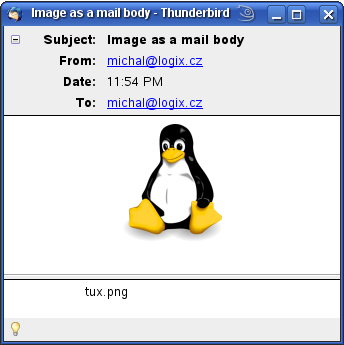
There is no Text or HTML body part and the email is not multipart/mixed. All that is in the email is Tux the Penguin image. You can immediately see it in your mailer but also can easily save it with its provided name tux.png. The same way it works with text files (or files forced to be text/plain, to be precise).
- Compose a multipart/alternative email with both HTML and Plain text part and inline images
-
Sending HTML emails is popular, especially among non-technical people. They like to change font colours, backgrounds, embed images and apply all sorts of other useless effects to their one short line of text. Indeed, me and you are more than happy with plain text and we both know that some mail readers can't even display colours and graphics at all (our office manager wouldn't believe!). And therefore it is a good practice for HTML messages to use multipart/alternative MIME format with both HTML and TEXT parts. In this example we're going to go wild and even embed an inlined image or two into the HTML part.
However first of all prepare the message body. Or bodies, actually. First one is body.html:
<!DOCTYPE html PUBLIC "-//W3C//DTD HTML 4.01 Transitional//EN">
<html>
<head></head>
<body bgcolor="#ffffff" text="#000000">
<div align="center">
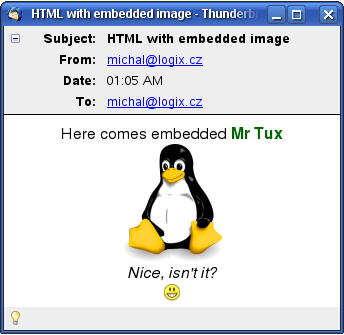
Here comes embedded <font color="#006600"><b>Mr Tux</b></font><br>
<img src="cid:tux.png"><br>
<i>Nice, isn't it?</i><br>
<img src="cid:smiley.png"><br>
</div>
</body>
</html>
Note the <img> tags with cid:filename.xyz source — that's the way to refer inlined attachments from inside the message. We will obviously have to
inline-attach tux.png and smiley.png to the message to make it work.Anyway, the second body file is a plain text representation of the above, call it body.txt:
Here comes embedded Mr Tux
... actually it doesn't ...
Not in a text-only mail reader.
Sorry
That's it. Here comes the magic command line that puts it all together:
./smtp-cli --from test@domain.com --to user@another.domain.org \
                 --subject "HTML with embedded image" \
		 --body-html body.html --body-plain body.txt \
		 --attach-inline tux.png --attach-inline smiley.png
And this is what we get: