SMTP CLI
SMTP client — earlier usage guide
Project updated · 13 November 2019
This is a simple SMTP command line client with a support for STARTTLS and SMTP-AUTH features over IPv4 and IPv6 protocols. It can also build mail messages for you, including such advanced features like MIME, HTML with plain text alternate messages, multipart messages, attachments, even inline attachments for embedding pictures into HTML mails. It can guess attachments' MIME-Types for you or optionally set the type on command line.
Use the script for checking given server's capabilities, test you server's setup or even create and send mails. Command line interface is intuitive, everything is scriptable and can run in a completely non-interactive mode. Apart from debugging mail servers setups it's also ideal for instance for sending log files from remote machines, running periodical mail delivery test loops, etc. If you ever needed to send a complex email with attachments from a command line, this script is what you need.
- Versions
- Version 2.5 (2009-07-21)
Added IPv6 support.
- Version 2.1 (2008-12-08)
Make the MIME modules optional. Simply disable the required functionality if they're not available.
- Version 2.0 (2008-11-18)
Support for message building through MIME::Lite, including attachments, multipart, etc.
- Version 1.x (released 2003, last updated 2006-08-26)
SMTP debugging tool with STARTTLS and SMTP-AUTH support.
- Version 2.5 (2009-07-21)
- Download the latest version
Download: smtp-client.pl
(or view in colourised mode)- Optional dependencies
-
RedHat Enterprise, Fedora and CentOS users may need some packages from the EPEL repository. In particular:
yum install perl-TermReadKey perl-MIME-Lite perl-File-Type perl-IO-Socket-INET6
Users of other Linux distributions will have to find the appropriate packages by themselves, or install the modules directly from CPAN.
- Make it executable
$ chmod +x smtp-client.pl
- Test on your localhost:
$ ./smtp-client.pl --verbose --host=localhost
[220] 'server.domain.top ESMTP Postfix'
> EHLO localhost
[250] 'server.domain.top'
[250] 'PIPELINING'
[250] 'SIZE 20480000'
[250] 'ETRN'
[250] '8BITMIME'
> QUIT
[221] 'Bye'
- Send an e-mail through a host which requires authentication after an encryption takes place:
 ./smtp-client.pl --verbose --host=relayhost.domain.top --enable-auth --user test \
--from test@domain.com --to user@another.domain.org --data message-body.txt
[220] 'server.domain.top ESMTP Postfix'
> EHLO localhost
[250] 'server.domain.top'
[250] 'PIPELINING'
[250] 'SIZE 10240000'
[250] 'VRFY'
[250] 'ETRN'
[250] 'STARTTLS'
[250] 'XVERP'
[250] '8BITMIME'
Starting TLS...
> STARTTLS
[220] 'Ready to start TLS'
Using cipher: EDH-RSA-DES-CBC3-SHA
Subject Name: /C=XX/CN=server.domain.top/Email=info@domain.top
Issuer  Name: /C=XX/CN=Domain.TOP Root CA/Email=ca@domain.top
> EHLO localhost
[250] 'server.domain.top'
[250] 'PIPELINING'
[250] 'SIZE 10240000'
[250] 'VRFY'
[250] 'ETRN'
[250] 'AUTH PLAIN LOGIN DIGEST-MD5 CRAM-MD5'
[250] 'AUTH=PLAIN LOGIN DIGEST-MD5 CRAM-MD5'
[250] 'XVERP'
[250] '8BITMIME'
AUTH method (PLAIN LOGIN DIGEST-MD5 CRAM-MD5): using CRAM-MD5
> AUTH CRAM-MD5
[334] 'PDE0OTQyOTcxOC4yNjAwOTYwQHNlcnZlci5kb21haW4udG9wPg=='
> dGVzdCBmOTUyY2RkM2VlODBiMzk1YjYxNDI4NjBlYzg2Y2ExZnJvb3Q=
[235] 'Authentication successful'
Authentication of test@localhost succeeded
> MAIL FROM: <test@domain.com>
[250] 'Ok'
> RCPT TO: <user@another.domain.org>
[250] 'Ok'
> DATA
[354] 'End data with <CR><LF>.<CR><LF>'
[250] 'Ok: queued as C5C3A299D7'
> QUIT
[221] 'Bye'
- Compose a plain text email with attachments
-
For composing emails you're gonna need an optional MIME::Lite perl module. See the download section above for details.
./smtp-client.pl --from test@domain.com --to user@another.domain.org \
                 --subject "Simple test with attachments" \
		 --body-plain "Log files are attached." \
                 --attach /var/log/some.log@text/plain \
		 --attach /var/log/other.log
Pretty self-explanatory, isn't it? Standard plain text email with attachments. The only interesting bit is the syntax used for enforcing MIME-Type of the second attachment. The syntax some.log@text/plain will make some.log attached as text/plain part, while the MIME-Type of other.log will be guessed by the script and eventually default to application/octet-stream.
- Attachment as an email body
-
./smtp-client.pl --from test@domain.com --to user@another.domain.org \
                 --subject "Image as a mail body" \
                 --attach /path/to/tux.png
If there is only one text or image file to be sent, the file itself could be the message body. At the same time it will be accessible as an attachment with a file name for easy saving. Best to show a screenshot I guess...
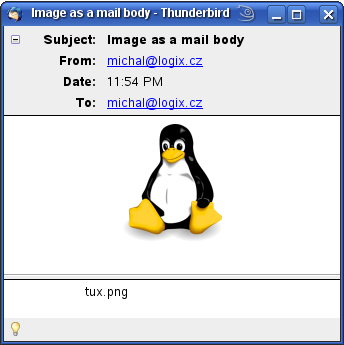
There is no Text or HTML body part and the email is not multipart/mixed. All that is in the email is Tux the Penguin image. You can immediately see it in your mailer but also can easily save it with its provided name tux.png. The same way it works with text files (or files forced to be text/plain, to be precise).
- Compose a multipart/alternative email with both HTML and Plain text part and inline images
-
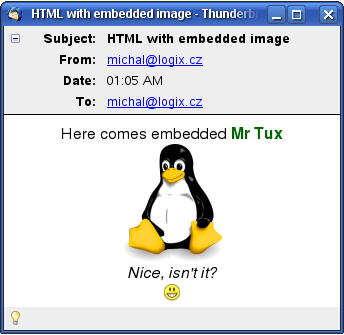
Sending HTML emails is popular, especially among non-technical people. They like to change font colours, backgrounds, embed images and apply all sorts of other useless effects to their one short line of text. Indeed, me and you are more than happy with plain text and we both know that some mail readers can't even display colours and graphics at all (our office manager wouldn't believe!). And therefore it is a good practice for HTML messages to use multipart/alternative MIME format with both HTML and TEXT parts. In this example we're going to go wild and even embed an inlined image or two into the HTML part.
However first of all prepare the message body. Or bodies, actually. First one is body.html:
<!DOCTYPE html PUBLIC "-//W3C//DTD HTML 4.01 Transitional//EN">
<html>
<head></head>
<body bgcolor="#ffffff" text="#000000">
<div align="center">
Here comes embedded <font color="#006600"><b>Mr Tux</b></font><br>
<img src="cid:tux.png"><br>
<i>Nice, isn't it?</i><br>
<img src="cid:smiley.png"><br>
</div>
</body>
</html>
Note the <img> tags with cid:filename.xyz source — that's the way to refer inlined attachments from inside the message. We will obviously have to
inline-attach tux.png and smiley.png to the message to make it work.Anyway, the second body file is a plain text representation of the above, call it body.txt:
Here comes embedded Mr Tux
... actually it doesn't ...
Not in a text-only mail reader.
Sorry
That's it. Here comes the magic command line that puts it all together:
./smtp-client.pl --from test@domain.com --to user@another.domain.org \
                 --subject "HTML with embedded image" \
		 --body-html body.html --body-plain body.txt \
		 --attach-inline tux.png --attach-inline smiley.png
And this is what we get: